


 Language


Realtek PCIe network interface card eFUSE/EEPROM Windows PGtool operating instructions
Here are the quick instructions for using Windows PGtool for Realtek PCIe network interface cards.
Install the latest version of Windows PCIe LAN drivers
Please go to the official Realtek website to download and install the latest version of the Windows PCIe LAN driver.
https://www.realtek.com/Download/List?cate_id=584
Important note!!
To support NIC burning through the Device IO Control interface, the following versions need to be updated:
NDIS Micro Port Driver
Windows 10/Windows 11: v10.053 or higher
NetAdapterCx driver
Windows 11: v11.002 or later
Perform eFUSE/EEPROM reading and writing
Step 1: Prepare the configuration file (CFG file)
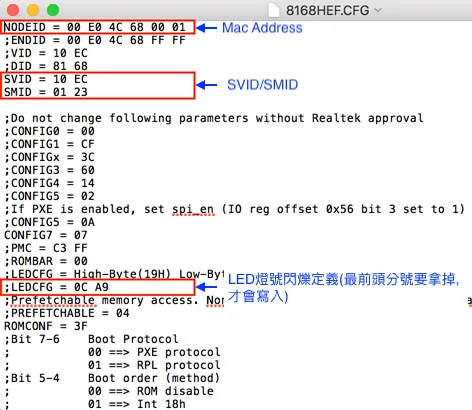
Before performing eFUSE or EEPROM burning, please modify the corresponding CFG profile content as required, for example:
MAC address (Node ID)
LED Settings
SVID / SMID
Other hardware parameters (please consult the corresponding FAE window first)
Attention!!
The eFUSE burning space capacity is limited. It is recommended to burn after confirming that the CFG settings are correct to avoid unnecessary eFUSE space waste.
CFG files corresponding to commonly used chips
Chip model | eFUSE configuration | EEPROM configuration |
RTL8111H | 8168HEF.CFG | 8168H.CFG |
RTL8119 / RTL8119I | 8119EF.CFG | 8119.CFG |
RTL8125B(S) / RTL8125BI | 8125BEF.CFG | 8125B.CFG |
RTL8125BG(S) | 8125BGEF.CFG | 8125BG.CFG |
RTL8126 | 8126EF.CFG | 8126.CFG |
RTL8125D | 8125DEF.CFG | 8125D.CFG |
RTL8125DG | 8125DGEF.CFG | 8125DG.CFG |
RTL8125K | 8125KEF.CFG | 8125K.CFG |
RTL8125CP | 8125CPEF.CFG | 8125CP.CFG |
RTL8127 | 8127EF.CFG | 8127.CFG |
RTL8127AT | 8127ATEF.CFG | 8127AT.CFG |
RTL8127ATF | 8127ATFEF.CFG | 8127ATF.CFG |
RTL8127AP | 8127APEF.CFG | 8127AP.CFG |
Step 2: Edit the Batch File
Please select the corresponding batch file according to the system architecture:
32-Bit operating system
WINPG32_IOCTL.bat
64-bit operating system
WINPG64_IOCTL.bat
For example: RTNicPgW64.exe /pgioctl /eeprom /r
Of which:
/pgioctl: Use device IO control mode
/eeprom: Specify EEPROM operation
/efuse: specify the efuse operation
/r: Read efuse or eeprom content
ARM64 Platform Notes
If you are using an ARM64 Windows system, please:
RTNicPg64.exe
Amend to:
RTNicPgARM64.exe
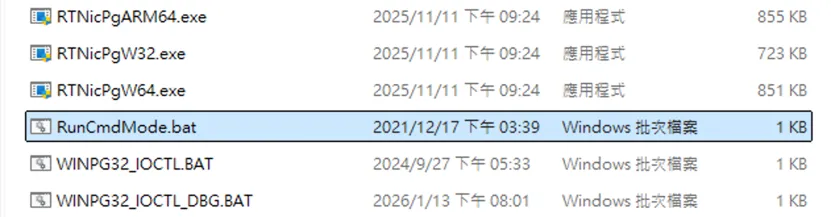
Step 3: Execute RunCmdMode.bat
Execute in the PG Tool Suite directory:
RunCmdMode.bat
This step enables you to run the environment in command-line mode.
Step 4: Execute the edited batch file
Execute the previously completed modifications:
WINPG64_IOCTL.bat
The read and write operations of eFUSE or EEPROM can be started.
Example: Reading RTL8111H eFUSE content
If you need to write or read eFUSE data from the RTL8111H, use the following command:
write
RTNicPgW64.exe /pgioctl /efuse
read
RTNicPgW64.exe /pgioctl /efuse /r
PG tool suites (including RTNicPgW64.exe, RTNicPgARM64.exe, CFG configuration files, and batch scripts) are limited support tools and are not usually available directly through public websites.
To request the PG tool kit, please contact:
Email:sales@richpowerhk.com